 I build software. The best place to find me is on
 Fluent Game Design With Fluent Interfaces
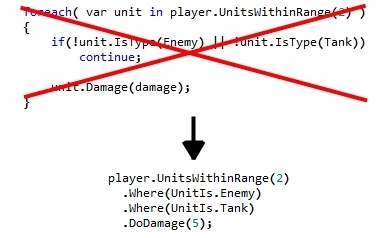 Game designers often find themselves writing code in modern games. Often, they have little to no programming experience and therefore must be taught the basics of programming (sequence, conditionals and loops). I propose utilizing a technique that simplifies the code written by game designers in their games. This technique is known as “Fluent Interfaces”.
What is Fluent?
Fluent interfaces allow game designers to write more fluid and readable code. Through the use of method chaining, English like sentences can be written to express game functionality. Fluent interfaces can be implemented in any object oriented programming language. Below is an example of a line in the game design document, a standard implementation example and a fluent example:
Game Design Document:
“Do 5 damage to all enemy tanks within range 2 of an entity”
Standard Example:
foreach( var unit in player.UnitsWithinRange(2) )
{
  if(!unit.IsType(Enemy) || !unit.IsType(Tank))
  continue;

  unit.Damage(5);
}
Fluent Example:
player.UnitsWithinRange(2)
  .Where(UnitIs.Enemy)
  .Where(UnitIs.Tank)
  .DoDamage(5);
This fluent example closely matches the design document and is easier to read. It also uses less language constructs like loops and conditions. With Intellisense, designers are given a context sensitive list of operations they can perform. Designers simply build up the expression that describes the original line in the game design document they are implementing.
How to implement Fluent Interfaces
Fluent interfaces are actually quite easy to implement. Objects expose methods that return a reference to the object itself allowing method chaining. The best way to describe this is by showing the implementation required for the examples above.
First, we create the object we will be working on (I’ve called it UnitsList in my examples). This gives us the first part of the fluent call (Get.UnitsWithinRange(2)).
public class ScriptObject
{
    UnitsList UnitsWithinRange(int range)
    {
        return new UnitsList(range);
    }
}
The UnitsList object must have a set of methods that return references to the object itself allowing method chanining:
public class UnitsList
{
    public UnitsList Where(UnitIs condition)
    {
        this.conditions.Add(condition);
        return this;
    }
}


public class UnitsList
{
    public void DoDamage(int damage)
    {
        foreach( var unit in this.mainUnit.UnitsWithinRange(range) )
        {
            if(!PassesConditions(unit))
                continue;

            unit.Damage(damage);
        }
    }

    private bool PassesConditions(Unit unit)
    {
        foreach( var condition in conditions)
        {
            if(!unit.IsType(condition))
                return false;
        }
        return true;
    }
}
There are a couple of key things to notice:
- This last code example looks a lot like the original standard example
- A lot more “engine” code is required to setup a fluent interface than a standard interface
So, in effect, an extra layer of abstraction is being placed over the original code. Rather than designers working on loops and conditions, they are calling (well named) methods. This makes their life a lot easier and simplifies maintenance of their gameplay code. It pushes the burden of maintenance down from the gameplay to the engine level and therefore on programmers, who are better suited to maintaining code. If there is a change in the engine or game, this extra level of abstraction serves to buffer the designers and reduce the amount of code that needs to be written.
Good Interface Design
Care needs to be taken when designing the interfaces and exposing methods to the designers. Rather than exposing all functions off a single object my recommendation is to define different objects for different situations. The example provided starts with the player and retrieves a list of units around it. Filters are then added before the final operation is performed on the resulting list. By limiting the methods available to the designer to simple filters there is little risk of them making a mistake. Also, the fact that the “DoDamage” function returns void stops them from chaining anything further.
Other Syntaxes
One small point is that designers can structure their fluent “sentences” in any way they please:
player.UnitsWithinRange(2).Where(UnitIs.Enemy).Where(UnitIs.Tank).DoDamage(5);

player.UnitsWithinRange(2)
  .Where(UnitIs.Enemy)
  .Where(UnitIs.Tank)
  .DoDamage(5);
There is no difference between the above two examples. It’s simply a matter of coding style preferred by the writer.
Conclusion
What do you think of Fluent Interfaces? Have you used a similar technique before? Do you think the extra engine code and maintenance is too much hassle for the gain in clarity to designers?
As an experiment, try exposing a small set of functionality through a fluent interface and see whether your designers like working with it.